Pyrat — TryHackMe Walkthrough

Pyrat — TryHackMe Walkthrough
Completed by: Shivam Pakade Completed on: 2025-11-08 Difficulty: Easy → Medium (credential discovery / small scripted brute force)
Table of contents
- Overview
- Recon & service discovery
- Finding credentials (git / repository / config)
- Cracking / using the credentials
- Initial access & user flag
- Notes, tools & mitigations
Overview
Pyrat is a TryHackMe room focused on finding exposed credentials in the target system (often inside a repository, config file or backup) and using them to gain access. This walkthrough documents the commands and logic I used to retrieve credentials and capture the user flag.
Recon and service discovery
Start with basic scanning to discover open ports and services:
1
2
3
4
5
# fast port scan for common ports
nmap -Pn -sV -p- $IP -T4 -oN nmap_full.txt

# or targeted quick scan
nmap -Pn -sV -p22,80,443,8080 $IP -oN nmap_quick.txt
Look for common services: SSH (22) and web (80/8080). If web is present, enumerate directories:
1
gobuster dir -u http://$IP -w /usr/share/wordlists/dirb/common.txt -x php,txt,html,zip
When you find web applications, look for obvious download points, exposed .git directories, backups or developer folders (e.g. /dev, /backup, /uploads, /repo).
Finding credentials
A frequent source of credentials is an accidentally exposed .git or developer folder. If you find a path like /opt/dev/ (or a .git tree), check for config files and credential leaks.
Example commands I used on the box:
1
2
# if you can access filesystem (via web or mounted volume), check for .git config
cat /opt/dev/.git/config
The .git/config may include user metadata. Also check the config or any credentials file that might contain username/password for remote origins:
1
2
3
[credential "https://github.com"]
  username = think
  password = <redacted_password_here>
Screenshot — git config showing username / password 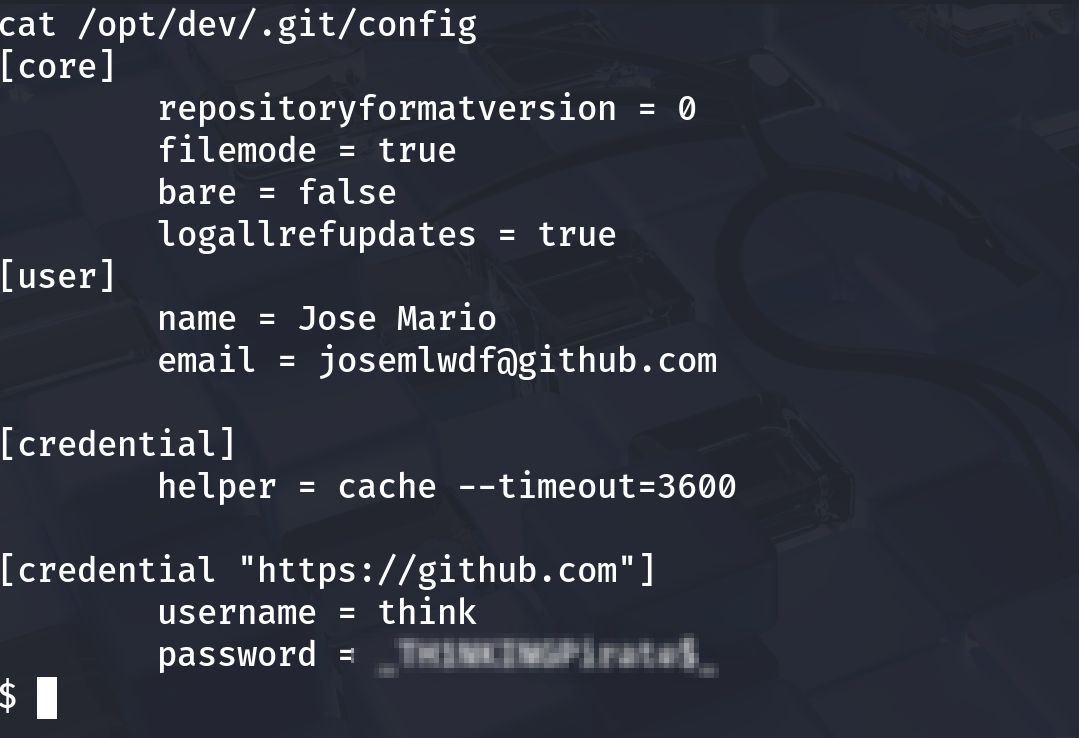
If the password is obfuscated or hashed / partial, either:
- use the discovered credential directly to SSH/HTTP if it’s plaintext, or
- brute-force the remaining portion using a small script or wordlist.
Cracking and using the credentials
If the credential requires brute force (partial or unknown), a simple Python script or hydra/medusa can be used. Example (the screenshot shows a small brute script that found the password):
1
2
3
# Example (high level)
python3 brute.py --target think --user think --pattern "<known-prefix>???" --wordlist passwords.txt
# The script prints: [+] Password found: Th1sIsP@ss
Screenshot — brute script output (password found) 
Once you have credentials, try SSH:
1
2
ssh think@<IP>
# or if git creds for https are for a remote, try them on the web app login
If SSH accepts the password, you have a shell as the think user. Immediately enumerate the home directory and check for flags.
Initial access and user flag
After logging in as the discovered user, collect basic facts:
1
2
3
4
id
whoami
hostname
ls -la
Common places for the user flag are the user’s home directory or a file named user.txt:
1
2
ls
cat user.txt
Screenshot — user flag captured 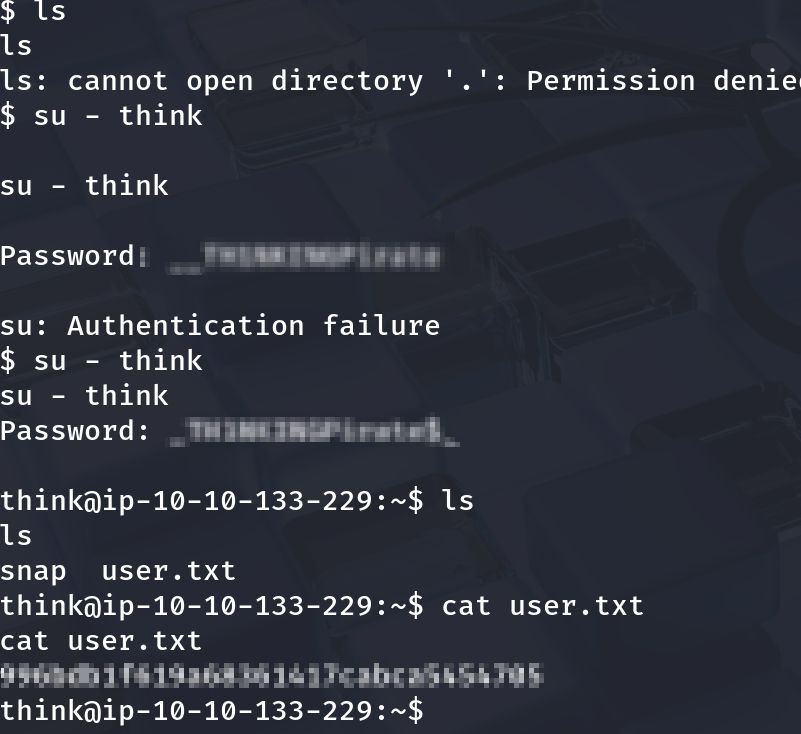
In my session I used the recovered username/password and obtained the user flag successfully.
Notes, tools & mitigations
Tools used
nmap— port/service discoverygobuster— web directory discoverycat,less,grep— local file inspection- small Python brute script — for targeted password discovery
Defensive notes / mitigation suggestions
- Never store plaintext credentials in repositories or config files. Use credential stores, environment variables with proper access control, or secrets managers.
- Disable credential caching in repo configs or ensure
.gitis not exposed over web paths. - Rotate and remove leaked credentials immediately when discovered.
- Apply principle of least privilege — service accounts should have minimal permissions.
- Add an automated reproduction script (takes the leaked config, extracts creds and attempts SSH), or
- Re-arrange images inside the post to match each step more precisely — tell me which screenshot you prefer for which section and I’ll update the MD file.